Submerged City Explorer with Humpback Whales
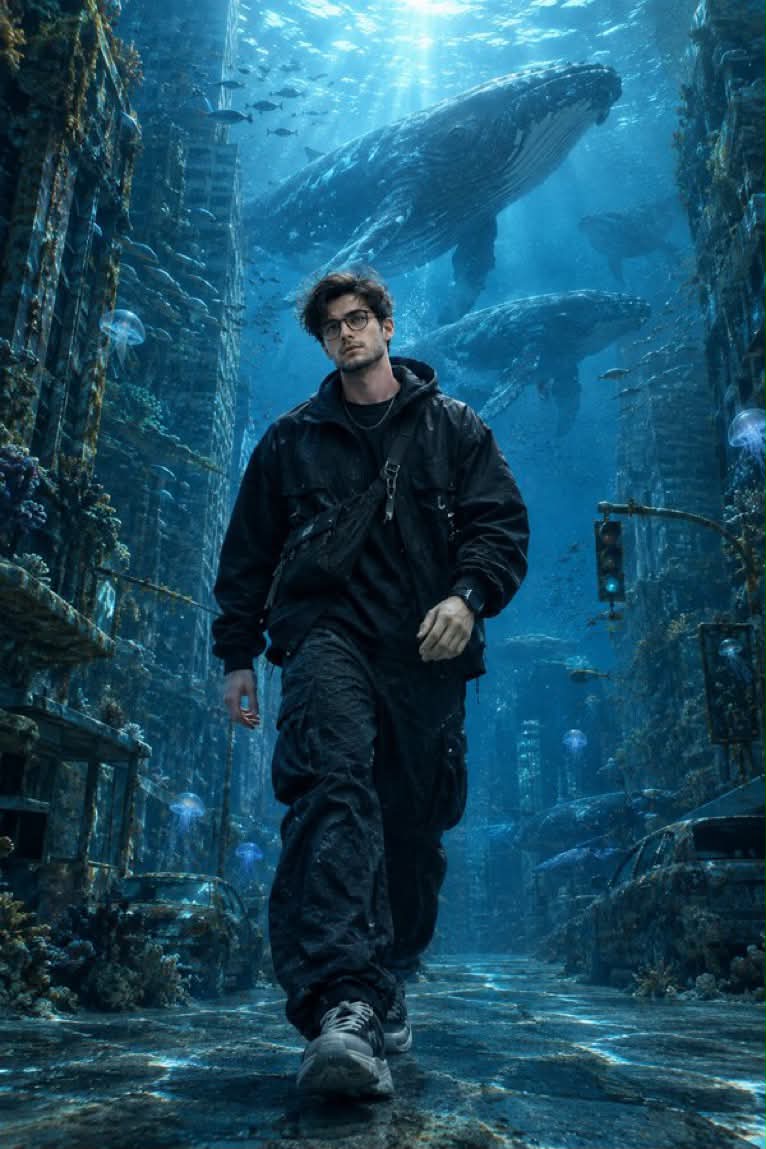
A breathtaking cinematic shot of a man walking through a flooded modern metropolis, surrounded by massive whales and ethereal underwater light.
Full Prompt · 100% Free304 words
Create an ultra-realistic cinematic photograph of a young handsome man calmly walking through a completely submerged modern city street deep beneath the ocean. The character is a realistic South Asian young man in his mid-20s, with thick slightly messy wavy black hair, neatly trimmed beard and mustache, expressive deep-brown eyes, natural warm-brown skin, and sharp but realistic facial features. He wears a black oversized waterproof technical jacket, dark cargo trousers, futuristic sneakers, a silver chain, black smartwatch and a small crossbody utility bag. His clothes and hair move naturally underwater. He is walking slowly along a completely flooded urban street, with realistic skyscrapers rising on both sides, partially covered in algae, coral and marine growth. Traffic lights, abandoned cars, street signs, storefronts and scattered debris are visible beneath the water. Behind him, several enormous humpback whales gracefully swim between the skyscrapers, creating an incredible sense of scale. Smaller schools of fish move around the buildings, while jellyfish and tiny glowing marine organisms drift through the water. Sunlight penetrates from the distant ocean surface above, creating beautiful volumetric god rays, caustic light patterns and floating particles throughout the scene. The deeper parts of the city gradually disappear into dark blue ocean haze. The man's face remains perfectly recognizable and photorealistic, with realistic skin pores, individual hair strands, subtle facial imperfections and natural expression. Cinematic composition: full-body character in the center foreground, low-angle perspective, skyscrapers creating strong depth, gigantic whales positioned in the background, atmospheric underwater perspective, dramatic scale contrast. Photography: professional cinema camera, 35mm lens, f/2.8, shallow depth of field while maintaining the environment, realistic underwater refraction, HDR, natural blue tones, cinematic lighting, high dynamic range, subtle film grain, physically accurate reflections and light scattering. Style: ultra-photorealistic, cinematic blockbuster frame, realistic human anatomy, realistic underwater physics, highly detailed environment, natural colors, 8K UHD, immersive scale.
Interactive Prompt Remixer
Customize subject, lighting, or framing slots below — the prompt updates live while preserving proven camera syntax.
Create an ultra-realistic cinematic photograph of a young handsome man calmly walking through a completely submerged modern city street deep beneath the ocean. The character is a realistic South Asian young man in his mid-20s, with thick slightly messy wavy black hair, neatly trimmed beard and mustache, expressive deep-brown eyes, natural warm-brown skin, and sharp but realistic facial features. He wears a black oversized waterproof technical jacket, dark cargo trousers, futuristic sneakers, a silver chain, black smartwatch and a small crossbody utility bag. His clothes and hair move naturally underwater. He is walking slowly along a completely flooded urban street, with realistic skyscrapers rising on both sides, partially covered in algae, coral and marine growth. Traffic lights, abandoned cars, street signs, storefronts and scattered debris are visible beneath the water. Behind him, several enormous humpback whales gracefully swim between the skyscrapers, creating an incredible sense of scale. Smaller schools of fish move around the buildings, while jellyfish and tiny glowing marine organisms drift through the water. Sunlight penetrates from the distant ocean surface above, crea
Compatible Models
How to Customize
Swap the subject, wardrobe, or color palette while keeping the lighting and camera phrasing intact. In Midjourney, add --ar 4:5 for portraits or --ar 16:9 for cinema frames.
Keep Exploring